
How To Identify a Phishing Email Before It’s Too Late

Time is of the essence when it comes to preventing a phishing attack on your business. An employee’s split-second assessment of whether to respond to a suspicious request is supremely critical. The wrong move can mean the difference between maintaining your business’s excellent reputation and the fallout that comes with a data breach.
However, providing security awareness training can empower your employees to make the right decisions when faced with having to make a swift call. Let’s take a closer look at how to identify a phishing email.
Download the eBook, How to Spot and Thwart Phishing Scams: A Guide for Businesses.
How to Identify a Phishing Email: The Common Characteristics
According to the National Institute of Standards and Technology (NIST), when learning how to identify a phishing email, you’ll want to consider that most phishing emails have these similar tell-tale features.
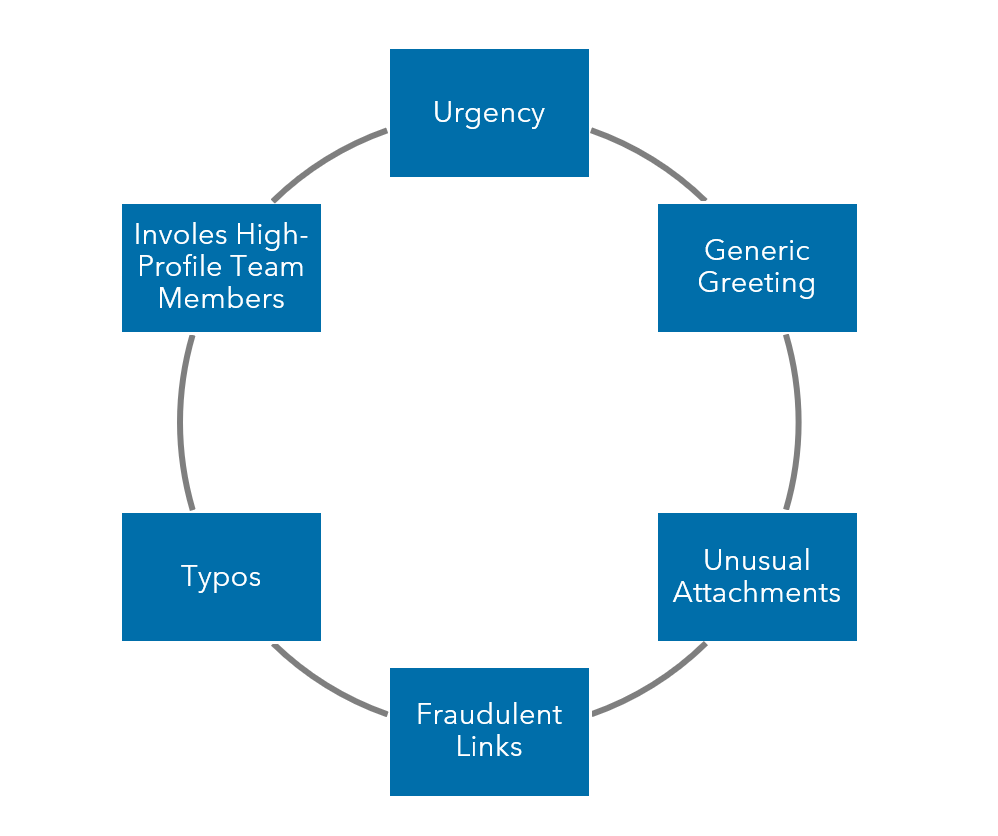
Urgency
Almost all phishing emails use language that seeks to instill a sense of urgency. This can include threats of loss or time-sensitive opportunities.
Generic greetings
Most phishing attacks are a volume endeavor. Because of this, cybercriminals are often unable to personalize messages. Fraudulent emails often use generic greetings such as, “Dear customer,” unlike the customization legitimate organizations offer where they call you by name.
Unusual attachments
Turn off the option to automatically download attachments. Even if a manual scan using your antivirus software shows the file is clean, treat all attachments with a high dose of suspicion.
Fraudulent hyperlinks
The hyperlink you see may be only a mirage. Check to see what happens when you hover your mouse over the link to determine if it’s directing to an alternate link.
Typos or unusual phrases
It’s not always the case, but many phishing emails contain grammatical errors; for example, they may use the word “patient” instead of “patience” or awkward phrasing like “feel free to contact with our executive.” Unusual phrasing is a hallmark of many phishing emails and is done both unintentionally (by non-native speakers) and intentionally (to defeat spam filters).
Involves High-Profile Team Members
While anyone can be a phishing target, keep in mind that high-level executives, such as CEOs, are at a particularly high risk of business email compromise, which can appear more personalized than generic attempts. This targeted phishing scam is one where the criminal impersonates an executive and attempts to lure employees into paying fake invoices or disclosing payroll information.
How To Identify a Phishing Email: The Process
Knowing the common characteristics is only half the battle of knowing how to identify a phishing email. You have to put your knowledge into action to actually defend against attacks.
It can be helpful to run through a simple checklist before reaching a conclusion about how to respond to an email request. Here are three steps recommended by the Federal Trade Commission (FTC):
Step 1: Do your research
Take the time to check out the website or phone number of the company or person sending the text or email. Try to discern that you’re communicating with the actual company and not about to download malware or talk to a scammer.
Step 2: Talk to someone
Sometimes just talking to a colleague can help you make a better judgment call. Perhaps your colleague received the same phony request, or they might notice something you’ve overlooked. As the saying goes, two heads are better than one.
Step 3: Use the phone
Look up the phone number of the vendor, colleague or client who sent the email and then call them directly. Confirm whether they have really made the request. Just be sure to use a number you know to be correct, not the number in the email or text.
Once you’ve finished these steps for how to identify a phishing email, you should be able to make an informed judgment about whether or not the email in question is actually phishing.
You’ve Identified a Phishing Email. What Now?
While you might be tempted to hit delete, if you want to prevent future phishing attacks, take these additional steps. Just because one person in your company knows how to identify a phishing email scam doesn’t mean everyone will.

Step 1: Alert your employees
It’s important to inform your employees of the phishing attempt, especially if the scammer was impersonating someone within your company. And it’s a great opportunity to teach your employees how to identify a phishing email.
If the email was impersonating one of your customers or vendors instead, then you can lend a helping hand by informing them, so they can alert their staff as needed.
Step 2: Document the attempt
Flagging the email as a phishing attempt with your email client can help prevent phishing emails from landing in your inbox in the future. Outlook offers these specific instructions on how to report phishing emails.
- Microsoft Office Outlook– With the fraudulent email selected, choose “report message” from the ribbon, and then select “phishing.” This step will remove the message from your inbox and helps Outlook filter so that you’re less likely to receive these types of messages going forward.
- Outlook.com– Choose the check box next to the suspicious message in your Outlook.com inbox. Select the arrow next to “junk” and then select “phishing.”
Additionally, the FTC wants to know about the phishing attack you avoided. They recommend that you forward phishing emails and texts to their Anti-Phishing Working Group. By reporting these phishing attempts to the FTC, you can help to catch the cybercriminals and alert others to the newest trends in phishing attacks.
Learn More About How To Identify a Phishing Email
Learning how to identify phishing emails is critical for employees, but a company’s cybersecurity journey certainly doesn’t end there. You’ll also want to take additional steps to make sure your company’s security is up to par.
Some of the steps you can take to protect yourself and your business include:
- Updating your passwords
• Enabling multi-factor authentication
• Updating your software
• Backing up your critical files
Keep in mind that your systems are only as strong as the employees who use them.
Warren Averett Technology Group can provide security awareness training for your staff so you can be confident that they know how to identify a phishing email and what to do once they’ve spotted one. Schedule a consultation with an expert to evaluate how secure your systems and processes are.
